INTERFACE_NAME: your wireless interface name, you can find it by "wconfig" command
AP_NAME : the ap you want to connect
AP_PASSWARD: the key for the AP_NAME
[root@localhost ~]# iwconfig INTERFACE_NAME essid "AP_NAME" key "AP_PASSWARD"
if the IP is accessed by DHCP
[root@localhost ~]# dhclient INTERFACE_NAME
Showing posts with label linux. Show all posts
Showing posts with label linux. Show all posts
Friday, July 11, 2008

Saturday, January 05, 2008
VMware Failed to allocate page for guest RAM
當vmware的檔案是複製的時候
power on 可能會發生"Failed to allocate page for guest RAM"的錯誤
Solusion
在檔案所在目錄找到 *.vmx
並加入一行mainmem.UseNamedFile = "false"
power on 可能會發生"Failed to allocate page for guest RAM"的錯誤
Solusion
在檔案所在目錄找到 *.vmx
並加入一行mainmem.UseNamedFile = "false"
Friday, July 20, 2007
Install Flash Player in x86_64 system
1.download nspluginwrapper rpm packages, plugin and viewer are need.
2.install nspluginwrapper
#rpm -ivh nspluginwrapper-i386-0.9.91.4-1.x86_64.rpm
#rpm -ivh nspluginwrapper-0.9.91.4-1.x86_64.rpm
3.download flashplayer from adobo.com
install flash-plugin ,so libflashplayer.so in the /usr/lib64/flash/ or other where,
$locate libflashplayer.so you can find it.
4.$cp libflashplayer.so ~/.mozilla/plugins/
5.$nspluginwrapper -i ~/.mozilla/plugins/libflashplayer.so
2.install nspluginwrapper
#rpm -ivh nspluginwrapper-i386-0.9.91.4-1.x86_64.rpm
#rpm -ivh nspluginwrapper-0.9.91.4-1.x86_64.rpm
3.download flashplayer from adobo.com
install flash-plugin ,so libflashplayer.so in the /usr/lib64/flash/ or other where,
$locate libflashplayer.so you can find it.
4.$cp libflashplayer.so ~/.mozilla/plugins/
5.$nspluginwrapper -i ~/.mozilla/plugins/libflashplayer.so
Sunday, March 25, 2007
Linux下完整支援nfts檔案系統 (讀/寫)
Linux NTFS Project支援 User Space 的 NTFS FileSystem.
這個 Driver 使用 FUSE(Filesystem implement in userspace)做介面,
剛剛試了一下, UTF-8 下中文沒有問題, 可以正常讀寫, 建立目錄.
首先必須安裝fuse:
先下載fuse,解壓縮至目錄下
#./configure
#make
#make install (must at root)
接下來就是安裝ntfs-3g,安裝方式跟fuse安裝方法一樣:
先下載ntfs-3g,解壓縮至目錄下
#./configure
#make
#make install (must at root)
最後就是將ntfs檔案系統掛載到Linux下:
ntfs-3g /dev/sda1 /mnt/windows -o silent,umask=0,locale=zh_TW.utf8
若要在啟動Linux時就直接掛載,則寫在 /etc/fstab
/dev/sda1 /mnt/windows ntfs-3g silent,umask=0,locale=zh_TW.utf8 0 0
不過我測試的結果,可是新建資料夾但是好像不能把資料夾直接複製進去,不知道是不是哪裡設定錯誤?
Friday, January 19, 2007
Kiba-Dock 執行問題
安裝完Kiba-Dock後發現Systray跟Iconediter不能開啟
會出現下面兩個錯誤:
1. ImportError: No module named SimpleGladeApp
2. ImportError: No module named egg.trayicon
上網查了一下,發現解決辦法
Type the following as root:
cp /usr/lib64/python2.4/site-packages/SimpleGladeApp.py /usr/lib64/python2.5/site-packages/
If SimpleGladeApp.py doesn't exist, install avahi package
Install pygtk and python-gnome-extras package
會出現下面兩個錯誤:
1. ImportError: No module named SimpleGladeApp
2. ImportError: No module named egg.trayicon
上網查了一下,發現解決辦法
Type the following as root:
cp /usr/lib64/python2.4/site-packages/SimpleGladeApp.py /usr/lib64/python2.5/site-packages/
If SimpleGladeApp.py doesn't exist, install avahi package
Install pygtk and python-gnome-extras package
Thursday, November 02, 2006
VMware Full Screnn Mode in Linux
1 - Install VMWare
2 - Install guest OS
3 - Run guest OS
4 - Install VMWare Tools
5 - VMWare -> View
6 - VMWare -> Edit -> Preferences -> Display
Autofit
[X] Autofit window
[X] Autofit guest
Full Screen
( ) Resize host
(o) Resize guest
( ) Don't resize
7 - VMWare -> Edit -> Preferences -> Input
Keyboard and Mouse
[X] Grab keyboard and mouse input on mouse click
[ ] Grab keyboard and mouse input on key press
Cursor
[ ] Grab when cursor enters window
[X] Ungrab when cursor leaves window
[ ] Hide cursor on ungrab
8- VMWare -> View -> Toolsbars
[o] Selective text beside icons
9 - Enjoy !
2 - Install guest OS
3 - Run guest OS
4 - Install VMWare Tools
5 - VMWare -> View
[X] Autofit window
[X] Autofit guest6 - VMWare -> Edit -> Preferences -> Display
Autofit
[X] Autofit window
[X] Autofit guest
Full Screen
( ) Resize host
(o) Resize guest
( ) Don't resize
7 - VMWare -> Edit -> Preferences -> Input
Keyboard and Mouse
[X] Grab keyboard and mouse input on mouse click
[ ] Grab keyboard and mouse input on key press
Cursor
[ ] Grab when cursor enters window
[X] Ungrab when cursor leaves window
[ ] Hide cursor on ungrab
8- VMWare -> View -> Toolsbars
[o] Selective text beside icons
9 - Enjoy !
Tuesday, September 19, 2006
安裝Internet Explorer
在Linux下雖然有Firefix來瀏覽網頁,不過有些網頁用Firefox顯示起來就是有些怪,而且以的還限制只能用IE來開啟.
要在Linux下裝Internet Explorer大部分都是使用wine來安裝,不過我是了很多版本就是裝不起來(在裝IE總是有錯誤訊息) ,最近在網路上有人把裝IE的步驟寫成一個執行程式,它會自動從微軟網頁下載套件然後安裝. 另外他還能選擇要裝什麼語言. 在他的網頁上還宣稱連IE 7都能裝.
首先要先安裝wine,在SuSE的安裝光碟就能找到(因為我裝wine的時候就把wine-tool一起裝了所以 不知道wine-tool是不是一定要奘)
到http://www.tatanka.com.br/ies4linux/news/ 下載 ies4linux
解壓縮後,執行目錄裡的ies4linux (#./ies4linux)
他會自動安裝IE6.0版,不過會問你是否要裝5.5跟5.0的版本以及要安裝甚麼語言
之後就會自動下載套件來安裝了
安裝完成後在桌面就會出現圖示,這時候點看看有沒有IE跑出來啦!
我在別的網站上看到說需要有 cabextract套件,不過我安裝的時候倒是很順利!

要在Linux下裝Internet Explorer大部分都是使用wine來安裝,不過我是了很多版本就是裝不起來(在裝IE總是有錯誤訊息) ,最近在網路上有人把裝IE的步驟寫成一個執行程式,它會自動從微軟網頁下載套件然後安裝. 另外他還能選擇要裝什麼語言. 在他的網頁上還宣稱連IE 7都能裝.
首先要先安裝wine,在SuSE的安裝光碟就能找到(因為我裝wine的時候就把wine-tool一起裝了所以 不知道wine-tool是不是一定要奘)
到http://www.tatanka.com.br/ies4linux/news/ 下載 ies4linux
解壓縮後,執行目錄裡的ies4linux (#./ies4linux)
他會自動安裝IE6.0版,不過會問你是否要裝5.5跟5.0的版本以及要安裝甚麼語言
之後就會自動下載套件來安裝了
安裝完成後在桌面就會出現圖示,這時候點看看有沒有IE跑出來啦!
我在別的網站上看到說需要有 cabextract套件,不過我安裝的時候倒是很順利!

Wednesday, September 13, 2006
安裝"compiz-quinn"

最近在網路上終於找到能用在SuSE的compiz管理套件"compiz-quinn".他的功能比SuSE的還更多,而且還能更改佈景.
首先在http://software.opensuse.org/download/Compiz-Quinn/SUSE_Linux_10.1/i586/
下載compiz-quinncvs,xgl-cvs,librsvg,libwnck,cgwd-themes然後使用zen-installer安裝就行了(如果有已經安裝過的就不用下載)
安裝完成後在作業階段新增compiz-start.py自動啟動,最後重新登入就會在系統列看到小圖示了
他還能隨意更換不同桌面系統的佈景設定,還有一堆關於XGL的外掛
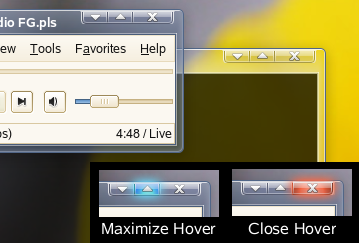
不過在我電腦用有點不大穩定,有時候把佈景轉換成compiz時整個桌面會掛掉害我重新開機不少次.
可能是顯示卡太嫩吧(內建的X200 >"< )
Saturday, June 17, 2006
安裝VMware Workstation
之前都是在XP下裝VMware來灌Linux
這還是第一次在Linux下用VMware來裝XP (誰叫Linux下類似visio的軟體不好用)
結果在Suse 10.1雖然能夠安裝成功,不過在後面的configure卻會發生錯誤
之後有請google在一個看都看不懂的德文網站看到有patch可以下載
不過要用到全螢幕還需要做設定 研究中....
這還是第一次在Linux下用VMware來裝XP (誰叫Linux下類似visio的軟體不好用)
結果在Suse 10.1雖然能夠安裝成功,不過在後面的configure卻會發生錯誤
之後有請google在一個看都看不懂的德文網站看到有patch可以下載
不過要用到全螢幕還需要做設定 研究中....
Subscribe to:
Posts (Atom)
